
In today’s professional landscape, LinkedIn isn’t just a platform; it’s a stage for thought leadership, networking, and career growth. But here’s the catch: maintaining a consistent, impactful LinkedIn presence is no small feat. Between tight schedules, creative blocks, and the sheer effort of crafting posts that resonate, many professionals find themselves struggling to keep up.
I found myself in this exact position at the end of 2024. As someone passionate about operational efficiency and process optimization, I knew there had to be a better way. Enter the LinkedIn Content Factory: a scalable, AI-powered system designed to streamline content creation while preserving the human touch. This post dives into the challenges I faced, the solution I built, and the results it delivered.
The problem: why LinkedIn content creation feels overwhelming
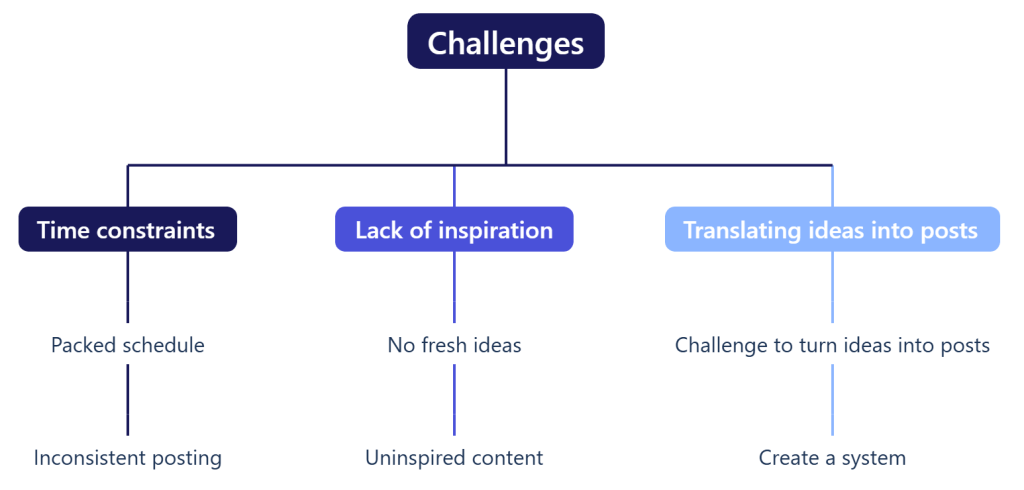
Creating LinkedIn content isn’t just about writing. It’s about strategy, consistency, and engagement. Here are the three main challenges I encountered:
1. Time constraints
- Like many professionals, I had a packed schedule that left little room for brainstorming and drafting posts.
- The result? Inconsistent posting and missed opportunities to engage with my network.
2. Lack of inspiration
- Coming up with fresh ideas regularly felt like a creative drain.
- Without a structured approach, it was easy to fall into the trap of repetitive or uninspired content.
3. Translating ideas into posts
- Even when I had ideas, turning them into concise, engaging posts that resonated with my audience was a challenge.
- I needed a system that could bridge the gap between raw ideas and polished content.
These challenges aren’t unique to me. They’re common paint points for professionals and teams alike. And they presented a clear opportunity to innovate.
The opportunity: bridging AI and authenticity
AI tools like ChatGPT have revolutionized content creation, offering speed and scalability. But here’s the thing: AI-generated content, while efficient, often lacks the authenticity and nuance that resonate with LinkedIn audiences.
To be transparent, the concept of a LinkedIn Content Factory isn’t entirely my own. I first learned about this system from Jan Koch through his “AI LinkedIn Content Factory” course, which was part of a bundle I completed at Creator School. The bundle offered valuable insights into AI, marketing, sales, and content creation.
That said, I noticed a critical gap in the process: personal input. One common complaint I’ve seen on LinkedIn is that AI-generated content often feels impersonal and fails to add real value. So, while Jan’s framework provided the foundation, my contribution was to refine the system by emphasizing the importance of personalization.
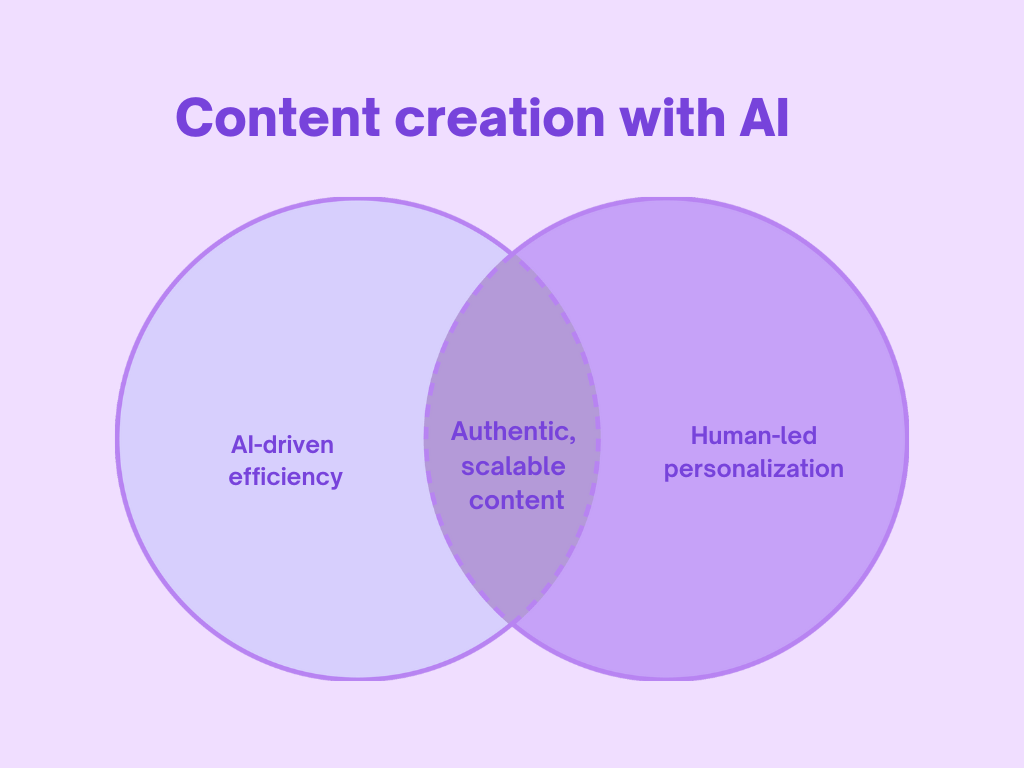
The opportunity lay in combining the best of both worlds:
- AI-driven efficiency: Automating repetitive tasks like idea generation and drafting.
- Human-led personalization: Adding the personal touch that makes content relatable and engaging.
This balance became the cornerstone of my approach to the LinkedIn Content Factory: a system that leverages AI for efficiency while ensuring every post feels authentic, valuable, and aligned with my personal brand.
The solution: the LinkedIn content factory
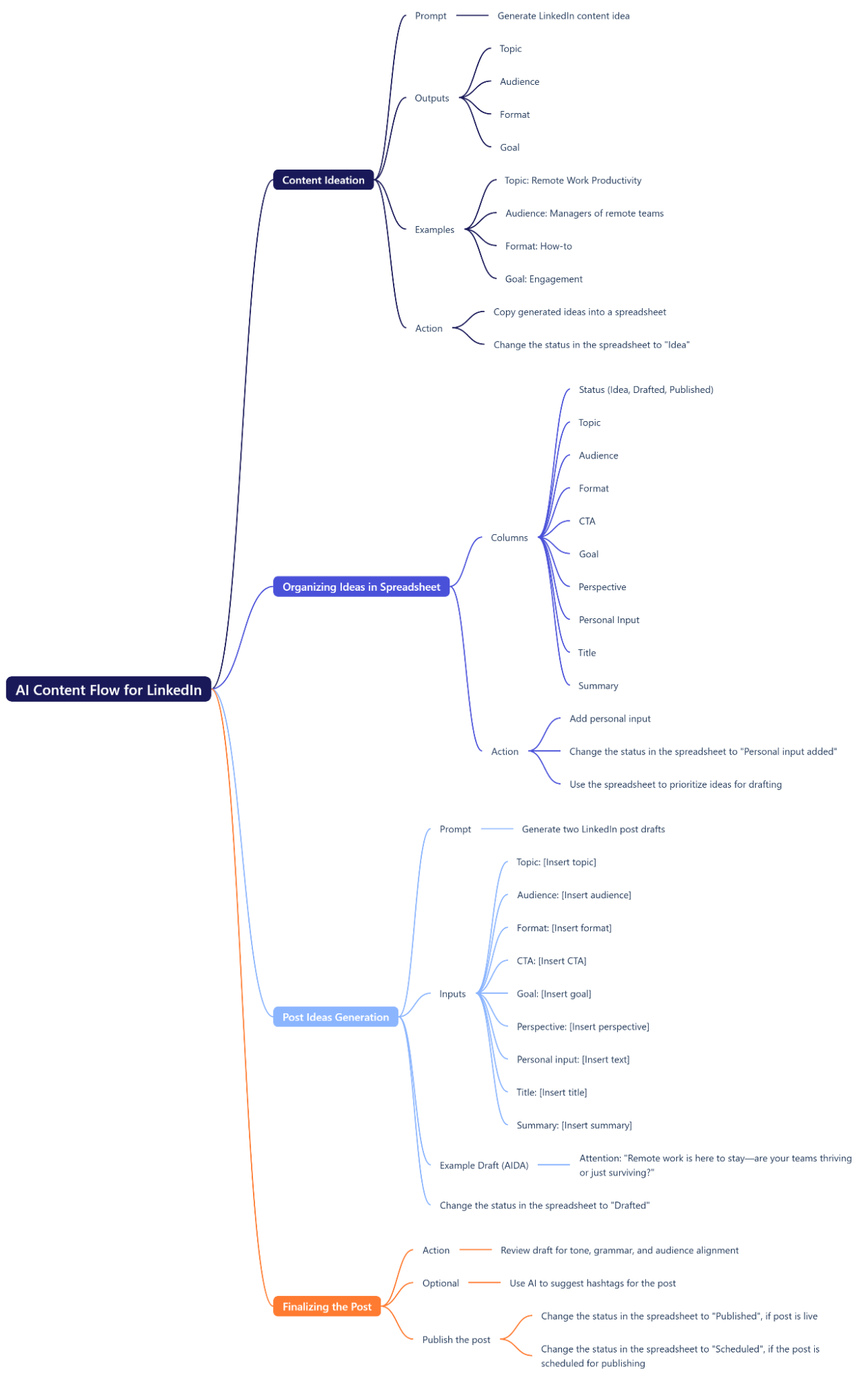
The LinkedIn Content Factory is more than just a workflow. It’s a philosophy for scalable content creation that balances efficiency with authenticity. Here’s how it works, step by step:
Step 1: Content ideation
The process begins with AI-powered brainstorming to generate a robust list of content ideas. Using a tailored prompt, I guide the AI to produce ideas that align with my audience, goals, and personal brand.
Prompt:
Generate 20 content ideas for my LinkedIn posts. Use the following format and options:
Status: Idea
Topic: [Insert topic, e.g., AI in Operations, Leadership, Remote Work, etc.]
Audience: [Insert audience, e.g., Startup founders, Operations managers, Remote team managers, etc.]
Format: Choose one from Reflective, Storytelling, Listicle, How-to/Actionable advice, Thought leadership, Repost with commentary, Poll/Question.
CTA: Choose one from Comment, Start conversation, Reflect on question, Share, Visit portfolio.
Goal: Choose one from Thought leadership, Show expertise, Network, Engagement, Conversation.
Perspective: Provide a unique perspective for each idea based on the topic and audience.
Personal Input: Leave this blank
Title: Create a clear and engaging title for each idea.
Summary: Write a 1-2 sentence summary for each idea.
Post: Leave this blank.
Hashtags: Suggest 3-5 relevant hashtags for each idea.
Publish Date: Leave this blank.
Metrics: Leave this blank.
Repurpose: Leave this blank.
Ensure the output is formatted as a table or list matching this column order for easy copying into the spreadsheet.
The AI generates outputs formatted as a table or list, making it easy to copy the ideas into a spreadsheet for tracking and prioritization.
Output example:

Important disclaimer: My GPT uses custom instructions and is already trained on my tone, goals, and style. If you want to use this system, make sure to personalize it to your own voice and objectives.
Step 2: Adding personal input
This is where the magic happens and where I add the most value. After the AI generates ideas, I revisit the spreadsheet and focus on the Personal Input column. For each idea, I contribute my unique perspective, thoughts, or advice. This step transforms generic AI-generated ideas into posts that reflect my voice, expertise, and authenticity.
Example:
- Topic: Process Optimization
- Perspective: SOPs Are Key
- Personal input: “”Are you the kind of person that when you buy something you study the user manual before trying the product or are you throwing the manual in the garbage just to retrieve it later? To me…”
- Title: The Secret to Scaling Without Chaos
- Summary: Struggling with inefficiency in your startup? SOPs are the answer. Here’s why they matter and how to start.
This step ensures that every post includes my point of view, actionable insights, and relatable anecdotes. It’s the personalization that makes the content truly resonate with my audience.
By addressing this step, I tackle a common complaint I’ve seen on LinkedIn: AI-generated content that feels impersonal or lacks depth. Adding my input bridges the gap between efficiency and authenticity.
Step 3: Adding missing details
Sometimes, I already know exactly what I want to talk about or have a strong starting point. In these cases, I either build on parts of what the AI generated or create a completely new entry based on my own input. When this happens, I use a tailored prompt to help fill in any missing details and ensure the idea is fully fleshed out. I insert my input wherever I have it, and let AI handle the gaps, preparing the content for the drafting phase.
Prompt:
I have a content idea for LinkedIn. Here are the details:
Topic: [Insert topic]
Audience: [Insert audience]
Format: [Insert format]
CTA: [Insert CTA]
Goal: [Insert goal]
Perspective: [Insert perspective]
Personal Input: [Insert text, if available. If not, leave blank.]
Title: [Insert title]
Summary: [Insert summary]
Please refine this idea, complete the missing fields, and format it for my spreadsheet. The spreadsheet has the following columns, so ensure the output matches this structure:
Status: [If blank, set as “Idea”; If not blank, set as “Personal input added”]
Topic: Use the provided topic.
Audience: Use the provided audience.
Format: Choose one from Reflective, Storytelling, Listicle, How-to/Actionable advice, Thought leadership, Repost with commentary, Poll/Question.
CTA: Choose one from Comment, Start conversation, Reflect on question, Share, Visit portfolio.
Goal: Choose one from Thought leadership, Show expertise, Network, Engagement, Conversation.
Perspective: Use the provided perspective or generate one if missing.
Personal Input: Use the provided input or leave blank if unavailable.
Title: Use the provided title or refine it if needed.
Summary: Use the provided summary or refine it if needed.
Post: Leave this blank.
Hashtags: Suggest 3-5 relevant hashtags.
Publish Date: Leave this blank.
Metrics: Leave this blank.
Repurpose: Leave this blank.
Ensure the output is formatted as a table or list matching this column order for easy copying into the spreadsheet.
Step 4: Drafting the post
With all the details in place, it’s time to bring the post to life. This step is where the ideas and inputs from the previous stages come together into a cohesive draft. I use AI to structure and draft the post, leveraging proven frameworks that ensure the content is engaging, clear, and aligned with my goals.
The AI helps me organize my thoughts and create a strong narrative, but it’s not just about automation. It’s about using the right tools to amplify my voice and ideas. By combining my personal input with AI’s efficiency, I can focus on crafting posts that resonate with my audience and drive meaningful engagement.

To guide the AI, I use a tailored prompt that ensures the draft reflects my tone, style, and intent. Here’s the exact prompt I use to generate the drafts:
Prompt:
I have a content idea for LinkedIn. Here are the details:
Topic: [Insert topic]
Audience: [Insert audience]
Perspective: [Insert perspective]
Personal input: [Insert text]
Title: [Insert title]
Summary: [Insert summary]
Provide two alternative drafts using the best frameworks or approaches for the post, a different one in each post. Make them ready for copy-paste, along with a title, summary, and hashtags.
Use these frameworks as optional guides:
AIDA (Attention, Interest, Desire, Action): Focus on grabbing attention, building interest, creating desire, and driving action.
PAS (Problem, Agitation, Solution): Highlight the problem, agitate the pain point, and provide a solution.
RIVET: Use vivid examples or storytelling to captivate and engage the audience.
STAR (Situation, Task, Action, Result): Use a real-world example to outline a situation, task, action taken, and result achieved.
Voice and Style Guide:
Use simple language to make complex ideas easy to understand.
Start with a humorous, thought-provoking, or status-quo-challenging statement.
Use metaphors, analogies, or everyday examples to explain complex topics.
Write concise sentences and avoid jargon.
Include emojis to break up text while staying professional.
End with a CTA or branded signature.
Step 5: Finalizing and publishing the post
The final step is all about polish and precision, transforming a solid draft into a LinkedIn-ready post. At this stage, AI generated two drafts based on my input. Then, I carefully review both drafts, identifying what works and what doesn’t. I provide specific feedback, highlighting the strengths of each draft and requesting a new version that incorporates my suggestions.
Once I have a refined draft, I make small tweaks to ensure the post reflects my voice and aligns perfectly with my goals. This includes adding any final touches, adjusting the tone or structure, and formatting the post for LinkedIn.
With this system, I aim to spend no more than 15 minutes per post. Here’s how I break it down:
- 5 minutes to add my personal input.
- 5 minutes to review, edit, and refine the draft.
- 5 minutes to provide feedback and finalize the post for LinkedIn.
By keeping the process efficient and structured, I ensure each post is high-quality, authentic, and ready to engage my audience without overthinking or overworking.

Content planning
To boost efficiency, I dedicate a few hours each month to prepare content for the entire month. Currently, my goal is to post twice per week, which means I need a maximum of 20 posts per month. Using this system, I estimate it will take me about four to five hours to prepare all the posts.
Once the posts are ready, I have two options:
- Schedule them in advance: I can schedule each post directly on LinkedIn or use a scheduling tool to automate the process.
- Publish as needed: Even without scheduling, I can have a new post live on LinkedIn in under 10 minutes since everything is already prepared.
The best part? Because I’ve already taken the time to add personal input (often more than I’ll use in a single LinkedIn post), I can easily repurpose the content for other platforms, such as my portfolio or blog.
To help you get started, here’s a content plan template you can use to track and organize your LinkedIn posts. Make your own copy, customize the dropdown menus to fit your goals, and adapt the prompts in the “Prompts” tab to reflect your unique voice and style. Just remember to set up your AI tools to write in your voice or include a few descriptive lines about your tone and style in each prompt.
Key features and innovations
What makes the LinkedIn Content Factory unique? Here are the standout features that set it apart:
- Framework integration: Proven frameworks like AIDA (Attention, Interest, Desire, Action) and PAS (Problem, Agitation, Solution) ensure posts are clear, structured, and action-oriented.
- Alternative drafts for creativity: For each idea, the system generates two drafts with different tones or perspectives, fostering creative exploration.
- Voice and style guide: A detailed guide ensures consistency, making posts both conversational and professional.
- Audience-specific content: Posts are tailored to the needs of the people you want to reach, focusing on thought leadership and actionable insights.
- Efficiency gains: The system reduces content creation time by at least 50%, enabling a consistent posting schedule without overwhelming the user.
Results and impact
The LinkedIn Content Factory has delivered measurable results:
- Efficiency: Reduced content creation time from one hour to about 15 minutes.
- Scalability: Enabled the production of ~20 posts per month, maintaining a consistent posting cadence.
- Personal impact: Helped me triple my profile views and build meaningful connections with my network.
Future enhancements: automating with Zapier
To make the system even more efficient, I’m exploring ways to integrate Zapier to automate repetitive tasks.
Here’s how the enhanced process would look:
- Idea generation: AI generates content ideas, which are automatically added to a spreadsheet via Zapier.
- Draft creation: Zapier triggers the generation of post drafts, ready for review.
- Personalization: I add my personal input to ensure each post is unique and authentic.
- Finalization and publishing: Posts are finalized and seamlessly published.
Benefits of automation:
- Time savings: Automates manual tasks, saving hours each week.
- Scalability: Handles higher volumes of content effortlessly.
- Seamless workflow: Connects AI tools, spreadsheets, and publishing platforms for a fully automated process.

Lessons learned
This project has taught me valuable lessons about the intersection of technology, creativity, and strategy:
- Automation needs a human touch: AI can handle repetitive tasks, but human oversight ensures content feels authentic and valuable.
- Frameworks matter: Using frameworks like AIDA and PAS provided structure, making it easier to create posts that resonate.
- Audience-centric content wins: Understanding your audience’s pain points and preferences is key to creating content that drives engagement.
💬I’d love to hear your thoughts! Does this system work for you? If you’ve tried it, let me know how it’s helping or how it could improve.
You can also check out my LinkedIn profile to see my posts in action. Let me know how “AI-generated” they sound and share any feedback you have. One suggestion I’ve already received is to vary the structure of my posts, which I plan to implement soon.
Author’s Note – Q1 Reflection
This post was originally written in early January 2025, right as I began implementing the LinkedIn Content Factory system. Since then, I’ve tested it in real-world conditions, reflected on what worked, and iterated on the process. At the end of Q1, I reviewed the data and feedback to refine my approach and I’ve got a few exciting updates I’ll be sharing in an upcoming post.
 Alex Gita | Driving Efficiency, Empowering Teams